 AiBrain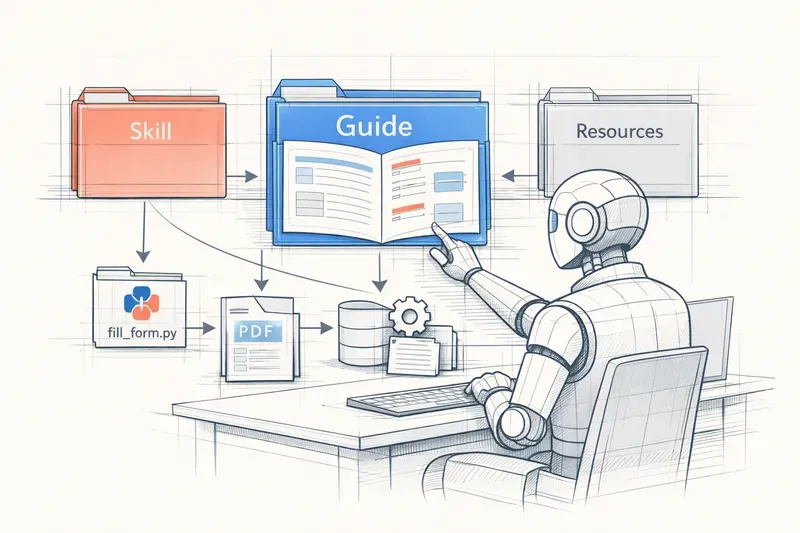
Related articles: AI Agent Design Guide | 11 Multi-Agent Orchestration Patterns | Building an Agent: The Building Blocks
Agent Skills is an open standard published by Anthropic on December 18, 2025 that enables transforming a generalist AI into a specialist for your business processes. Instead of repeating the same instructions in every conversation, you create an “onboarding kit” — a folder containing instructions, scripts, and resources — that the AI automatically loads when needed.
The problem solved: AIs like Claude are brilliant but don’t know your specific processes. You have to re-explain everything each time, which is inefficient.
The solution: Agent Skills uses “progressive disclosure”: information loads in levels (job description → guide → detailed resources), avoiding overloading the AI’s memory. A skill is a folder containing a SKILL.md file with YAML metadata and Markdown instructions, plus optional resources (Python scripts, documentation).
Impact: The standard is already adopted by Microsoft (VS Code, GitHub), Cursor, Goose, Amp, and OpenCode. A skill created for Claude can work in other AI assistants that support the standard, like a universal PDF file.
In practice: Agent Skills works on Claude.ai (upload skills as zip), Claude API (organizational sharing), and Claude Code (automatic local discovery). Anthropic provides 4 pre-built skills for PowerPoint, Excel, Word, and PDF.
In one sentence: Agent Skills transforms a brilliant generalist into a specialist of your processes, by giving it an onboarding manual it consults at the right time.
Glossary
- Agent Skills
- Open standard published by Anthropic on December 18, 2025 enabling the creation, deployment, sharing, and discovery of “skills” (capabilities) for agentic AIs. A skill is a folder containing instructions, scripts, and resources that the AI automatically loads when needed.
- Claude
- Language model developed by Anthropic. Claude can use Agent Skills to specialize in specific tasks.
- Composition
- Agent Skills’ ability to combine multiple skills to accomplish complex workflows. For example, using an Excel skill to analyze data and a PowerPoint skill to create a presentation.
- Context
- The memory space available for the AI in a conversation. Claude 3.5 Sonnet has a limit of approximately 200,000 tokens. Progressive disclosure helps avoid saturating this context.
- Function calling
- Technique where the AI calls predefined functions. Agent Skills goes further by enabling complex workflows with multiple files and scripts.
- Markdown
- Simple text format used to write skill documentation. Files like SKILL.md, FORMS.md, etc. are in Markdown.
- MCP (Model Context Protocol)
- Another Anthropic standard for connecting AIs to databases, APIs, and external tools. Complementary to Agent Skills.
- Progressive disclosure
- Architectural principle of Agent Skills where information loads in levels: first metadata (job description), then the main guide (SKILL.md), then detailed resources if needed. Avoids overloading the AI’s memory.
- RAG (Retrieval-Augmented Generation)
- Approach where the AI searches for information in a knowledge base before responding. Agent Skills is a specialized form of RAG for procedural processes.
- SDK (Software Development Kit)
- Set of developer tools provided by Anthropic to create and manage skills. Available on agentskills.io.
- Skill
- A folder containing a SKILL.md file (required) with YAML metadata and Markdown instructions, plus optional resources (Python scripts, documentation files). A skill transforms the AI into an expert in a specific domain.
- SKILL.md
- Main required file of a skill. Starts with YAML metadata (name, description) followed by Markdown instructions. Automatically loaded when the skill is triggered.
- Specification
- Official document explaining exactly how to create a skill according to the Agent Skills standard. Available on agentskills.io.
- Open standard
- Format published publicly that anyone can use and implement. Agent Skills is an open standard, so usable by other AIs than Claude (GitHub Copilot, VS Code, etc.).
- Stateless
- Characteristic of language models like Claude that don’t maintain persistent memory between requests. Each message receives the complete conversation history plus relevant skills.
- Token
- Unit of measurement for AI memory. Approximately 100 tokens equal 75 words. A skill’s metadata is about 100 tokens, which is very lightweight.
- YAML
- Structured data format used for metadata at the beginning of the SKILL.md file. Allows defining the skill’s name and description in a standardized way.
Imagine hiring someone brilliant to manage your PDF invoices. This person can read, write, reason… but they don’t know your specific process: which field to fill first, which script to run to extract data, where to find the invoice template validated by accounting.
Every day, you have to re-explain everything. “Use this Python script, check these fields, pay attention to this format…” It’s exhausting, and above all inefficient.
This is exactly the problem that Agent Skills solves, an open standard published by Anthropic on December 18, 2025. Instead of repeating the same instructions every time, you create an “onboarding kit” that the AI automatically loads when needed. Let’s see how it works, with a metaphor everyone knows: a new employee’s first day.
The problem: constantly repeating the same instructions
When Claude (Anthropic’s AI) receives a request like “Fill out this PDF form,” it knows how to reason and understand language. But it doesn’t know how you want it done:
- Which tool to use to open the PDF?
- Which fields are mandatory in your company?
- Which date format to respect?
Result: you have to give it these instructions in every conversation. As if you were re-explaining the onboarding process to an employee every morning.
Agent Skills solves this problem by allowing you to create a folder — called a “skill” — containing all these instructions. The AI loads this folder only when needed, like an employee consulting the company manual for a specific task.
The solution: a manual that loads at the right time
When you arrive at a new company, you’re not asked to memorize 300 pages of procedures on the first day. Instead, you receive an onboarding kit organized into three levels:
Level 1: The job description (2 lines)
“You’re responsible for PDF invoices. You intervene when we talk about forms, data extraction, or document merging.”
Level 2: The startup guide (a few pages)
Common procedures: how to open a PDF, which tools to use, steps to follow.
Level 3: Detailed resources (available on demand)
Complete technical documentation, automated scripts, examples of already filled forms.
You consult these resources progressively, only when you need them. This is what Anthropic calls “progressive disclosure”: loading information in stages, instead of swallowing everything at once.
What does this mean concretely? Imagine you ask the AI: “Fill out this expense report form.”
- At startup, the AI already has a small card in memory for each installed skill. For the PDF skill, it sees: “PDF Processing - Text extraction, form filling, document merging. Use when talking about PDFs.”
- When you mention forms, the AI recognizes that the PDF skill is relevant. It then loads the complete guide (the
SKILL.mdfile). - If necessary, it fetches additional resources: a
FORMS.mdfile with specific instructions on forms, or a Python scriptfill_form.pyto automate filling.
All this happens automatically, without you having to re-explain anything.
Running example: transforming Claude into a PDF expert
To understand well, let’s follow a concrete example: creating a skill that transforms Claude into an expert in PDF manipulation.
Step 1: Create the skill folder
A skill is simply a folder containing a main file called SKILL.md. Here’s what the structure looks like:
pdf-skill/
├── SKILL.md           (the main guide)
├── FORMS.md           (instructions for forms)
├── REFERENCE.md       (detailed API documentation)
└── scripts/
    └── fill_form.py   (Python script to automate)
Step 2: Write the job description (metadata)
The SKILL.md file starts with a “job description” in YAML format (a simple data format):
---
name: pdf-processing
description: Text and table extraction from PDFs, form filling, document merging. Use when the user mentions PDFs, forms, or document extraction.
---
This card is always loaded in memory from Claude’s startup. That way, it knows this skill exists and when to use it. But it’s ultra-lightweight (about 100 tokens, equivalent to 75 words), so it doesn’t overload memory.
Step 3: Write the startup guide
Right after the card, in the same SKILL.md file, we write the main instructions:
# PDF Processing

## Quick start
Use the pdfplumber library to extract text:

import pdfplumber
with pdfplumber.open("document.pdf") as pdf:
    text = pdf.pages[0].extract_text()

## Form filling
To fill forms, consult FORMS.md.
This guide is loaded only when the skill is triggered. If you ask “Summarize this PDF,” Claude loads these instructions. If you ask “What time is it?,” it doesn’t load them.
Step 4: Add detailed resources
The FORMS.md file contains specific instructions for forms. Claude only loads it if you talk about forms. The fill_form.py script can be executed directly by Claude without even being read: only the script’s result (for example “Form filled successfully”) enters memory.
Result: you’ve created a complete onboarding kit. Now, every time you ask Claude to work on a PDF, it automatically loads the right instructions, without you having to repeat them.
How it works technically (without jargon)
You might wonder: “How does Claude know when to load a skill?”
The answer lies in the environment where Claude operates. When you use Claude with advanced capabilities (like on Claude Code or via the API), it runs in a kind of mini virtual computer with access to a file system.
Imagine a desk with folders. Skills are physical folders on this desk. When Claude needs information, it uses simple commands (like cat SKILL.md on the command line) to read the folder’s contents.
Here’s what happens behind the scenes:
-
At startup, Claude receives a “system prompt” (a base instruction) that lists all installed skills with their job descriptions. Example: “You have access to the ‘pdf-processing’ skill for manipulating PDFs.”
-
When you make a request, Claude checks if a skill matches. If yes, it reads the main file (
SKILL.md) using a bash command:cat pdf-skill/SKILL.md. -
If necessary, it reads other files referenced in
SKILL.md(likeFORMS.md) or executes Python scripts without loading them into memory.
This architecture has a huge advantage: there’s no practical limit to the amount of information a skill can contain. You can include 50 pages of documentation, 20 Python scripts, 100 examples… as long as Claude only loads what it needs, it doesn’t overload its memory.
Why it’s an “open standard”
You may have noticed I’m talking about an “open standard.” What does this mean concretely?
Before December 18, 2025, Agent Skills was an internal Claude feature. Anthropic transformed it into an open standard by publishing:
- A specification (a document that explains exactly how to create a skill)
- A reference SDK (tools for developers)
- All available on agentskills.io
“Open” means anyone can use this format, not just Claude. Microsoft has already adopted it in VS Code and GitHub. Tools like Cursor, Goose, Amp, and OpenCode too.
Concretely, if you create a skill for Claude, it can also work in GitHub Copilot or other AI assistants that support the standard. Like a PDF file you can open in Adobe, Chrome, or Word: the format is universal.
Where to use skills?
Agent Skills works in several environments:
Claude.ai: You can upload your own skills (as zip files) via Settings > Features. Anthropic also provides 4 pre-built skills for PowerPoint, Excel, Word, and PDF.
Claude API: Developers can create and share skills within their organization via the API.
Claude Code: Skills are local folders that Claude automatically discovers.
Note: skills don’t automatically sync between these environments. If you create a skill on Claude.ai, you need to re-upload it on the API to use it there.
A concrete example: the PowerPoint skill
To illustrate the system’s power, let’s take a pre-built skill by Anthropic: the PowerPoint skill.
Without this skill, if you ask Claude “Create me a 5-slide presentation on climate change,” it can generate text, but can’t create the PowerPoint file. You’d have to give it detailed instructions: “Use the python-pptx library, create a Presentation object, add slides with add_slide()…”
With the PowerPoint skill, you just say “Create me a presentation” and Claude:
- Recognizes that the
pptxskill is relevant - Loads the instructions from
SKILL.md - Uses the provided Python scripts to create the file
- Returns a ready-to-use
.pptxfile
All without you needing to know Python or the structure of a PowerPoint file.
Composing multiple skills: the complex workflow
One of Agent Skills’ strengths is composition: combining multiple skills for complex tasks.
Imagine you ask: “Analyze the data in this Excel file, generate a chart, and create a PowerPoint presentation with the results.”
Claude will:
- Load the Excel skill to read and analyze data
- Load the PowerPoint skill to create the presentation
- Use scripts from both skills to automate everything
It’s like an employee consulting multiple company manuals to accomplish a complex mission. Each skill brings its specialized expertise, and Claude orchestrates it all.
What you can do with Agent Skills
The possibilities are vast. Here are some concrete examples:
For developers:
- Create an “AWS Deployment” skill with your specific procedures
- Create an “Automated Testing” skill with your code conventions
For business teams:
- Create an “HR Process” skill with your contract templates and onboarding procedures
- Create a “Financial Analysis” skill with your Excel models and validation rules
For researchers:
- Create a “Scientific Data Analysis” skill with your R or Python scripts
- Create an “Academic Writing” skill with your citation guidelines
The central idea: capture your procedural expertise (how to do something) in a format that the AI can load and use automatically.
Synthesis: from generalist to specialist
Let’s summarize the journey we’ve taken:
-
The problem: AIs like Claude are brilliant, but they don’t know your specific processes. You have to repeat everything in every conversation.
-
The solution: Agent Skills creates an “onboarding kit” — a folder with instructions, scripts, and resources — that the AI automatically loads when needed.
-
Progressive disclosure: Information loads in levels (job description → guide → detailed resources), avoiding memory overload.
-
The open standard: Published on December 18, 2025, the format is usable by any AI, not just Claude.
-
Composition: Multiple skills can be combined for complex workflows.
In one sentence: Agent Skills transforms a brilliant generalist into a specialist of your processes, by giving it an onboarding manual it consults at the right time.
Pedagogical simplifications
To make this article accessible, I’ve simplified several technical aspects. Here’s what you should know:
What I simplified
1. The employee and memory metaphor
I compared the AI to an employee who “loads information into memory.” In reality, language models like Claude are stateless: they don’t maintain persistent memory between requests. Each time you send a message, Claude receives the complete conversation history plus relevant skills.
The metaphor remains valid for understanding progressive disclosure, but technically, Claude doesn’t “memorize” like a human: it receives a context that changes with each message.
2. YAML and Markdown files
I mentioned that SKILL.md starts with YAML, but didn’t explain what YAML (a structured data format) or Markdown (a simple text format) is. For a beginner, what matters is understanding that it’s an organized text file, not the exact syntax.
3. Context limits
I said there’s “no practical limit” to the amount of information in a skill. This is true in the sense that unloaded files don’t consume tokens (the unit of measurement for AI memory). But Claude does have a context limit (approximately 200,000 tokens for Claude 3.5 Sonnet). If you load too many files simultaneously, you’ll reach this limit.
Progressive disclosure helps avoid this problem, but doesn’t eliminate it completely.
4. The “open standard” aspect and portability
I simplified by saying skills work “in any AI that supports the standard.” In reality, each platform can implement the standard differently. A skill created for Claude will probably work in GitHub Copilot, but may require adjustments based on each AI’s specific capabilities.
5. Security
I didn’t talk much about security. In reality, loading a skill is like installing software: it can contain malicious code. Anthropic strongly recommends only using skills from trusted sources (yourself or Anthropic). A malicious skill could exfiltrate data or execute dangerous commands.
Why these simplifications are OK
These simplifications don’t distort Agent Skills’ central concept. They allow a beginner to understand:
- Why it exists (avoid repeating instructions)
- How it works (progressive disclosure by levels)
- What it enables (specialization and composition)
A technical expert can deepen with the official documentation, but a 15-year-old high school student can now explain Agent Skills to their parents.
What remains accurate
Despite the simplifications, these points remain scientifically rigorous:
- Agent Skills is indeed an open standard published on December 18, 2025
- Progressive disclosure works well by levels (metadata → instructions → resources)
- Skills are indeed folders containing
SKILL.mdwith YAML frontmatter - Composing skills for complex workflows is well supported
- The format is indeed adopted by Microsoft, GitHub, Cursor, and other tools
Going further
If this article has made you want to explore, here are some paths:
Open questions:
- How will skills evolve when AIs can create and modify their own skills automatically?
- What will be the interaction between Agent Skills and Model Context Protocol (MCP), another Anthropic standard for connecting AIs to external data sources?
- How to manage skill versioning in a large organization? (If you modify a skill, how to ensure all users have the correct version?)
Related concepts:
- Model Context Protocol (MCP): Another Anthropic standard for giving AIs access to databases, APIs, and external tools
- Function calling: A technique where the AI calls predefined functions (Agent Skills goes further by enabling complex workflows)
- RAG (Retrieval-Augmented Generation): An approach where the AI searches for information in a knowledge base before responding
Paths for deepening:
- Create your first simple skill (for example, a “Meeting Summary” skill with your preferred format)
- Explore Anthropic’s 4 pre-built skills (PowerPoint, Excel, Word, PDF) to see how they’re structured
- Read the complete specification on agentskills.io to understand technical details
Web Resources
This article is based on the following sources:
-
Equipping agents for the real world with Agent Skills - Anthropic engineering article explaining Agent Skills’ architecture and philosophy (initially published in October 2025, updated in December 2025)
-
Agent Skills Overview - Claude Documentation - Complete official documentation on using Agent Skills
-
Agent Skills: Anthropic’s Next Bid to Define AI Standards - Analysis of Anthropic’s strategy to create AI infrastructure standards
-
Anthropic launches enterprise ‘Agent Skills’ and opens the standard - VentureBeat article on the open standard announcement on December 18, 2025
-
agentskills.io - Official Agent Skills standard website with specification and SDK
Related Articles on AI Agents
- AI Agent Design Guide: What Works, What Fails — The golden rule of deterministic feedback and 7 design principles
- Meta-Analysis: Capabilities, Limitations and Patterns of AI Agents — Analysis of 100+ publications: what really works
- The 11 Multi-Agent Orchestration Patterns — Pipeline, Supervisor, Council, Swarm: which pattern to choose?
- Building an Agent: The Art of Assembling the Right Building Blocks — Languages, orchestration frameworks, models and infrastructure